CS2 Float Value Guide 2026: Wear, Prices & When It Actually Matters

发布于 在 CS2
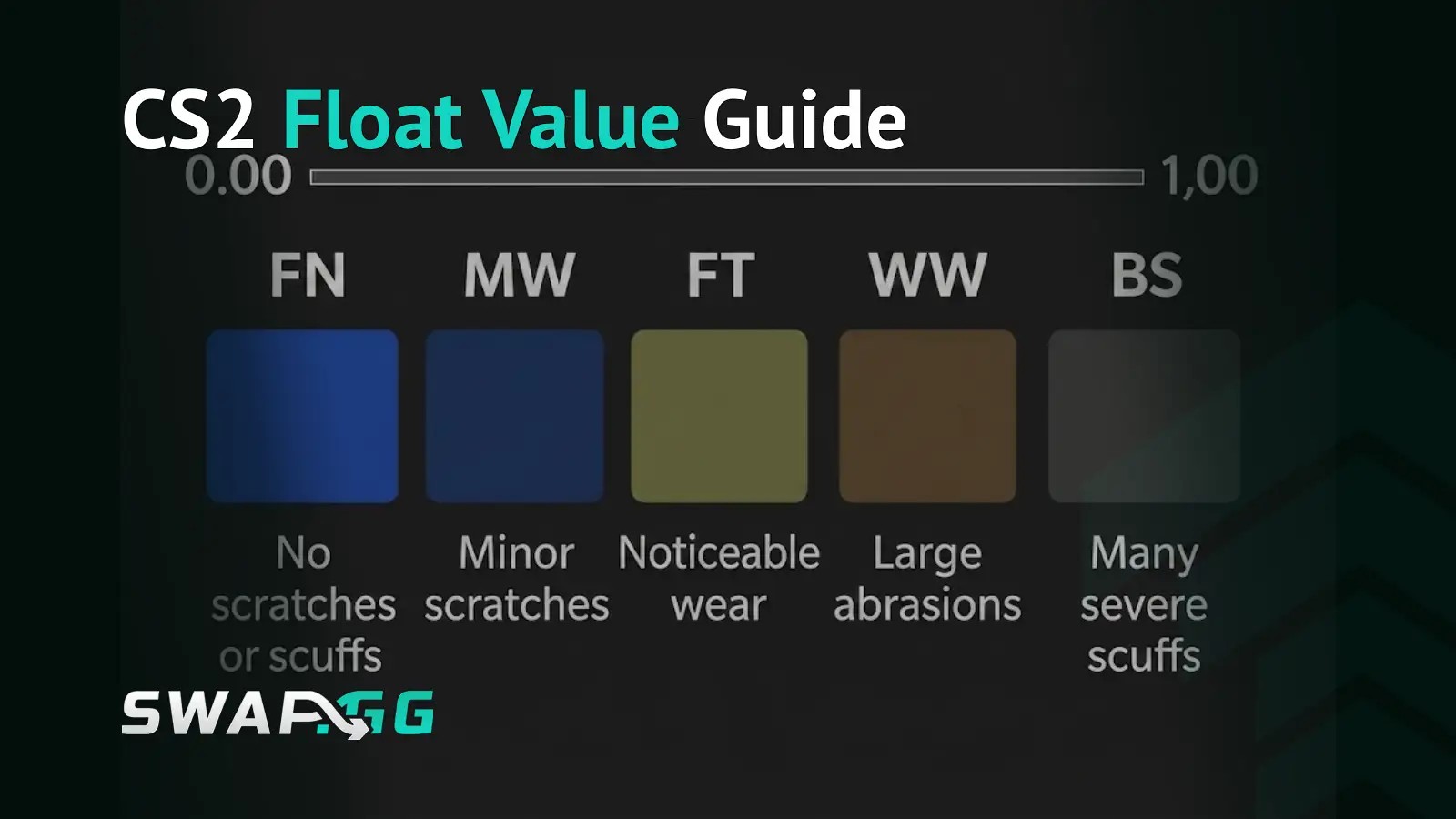
Most players overpay for float on skins where float changes almost nothing visually, and underestimate its impact on the specific skins where it changes everything. The number itself is simple: a value between 0.00 and 1.00, lower means cleaner, higher means more worn. Where confusion costs real money is in treating float as a universal quality signal when it is finish-dependent. Float sensitivity varies by finish type and specific skin, which means the premium worth paying on one skin is often not worth paying on another that looks superficially similar in the market listing.
What Float Actually Is
Definition: A float value is a permanent numerical identifier between 0.00 and 1.00 assigned to every CS2 weapon skin at the moment it is generated, whether through a case opening, a weekly drop, or a trade-up contract. It determines which of the five wear conditions the skin falls into, how visually worn it appears, and in many cases how much it is worth on the market. Float values are permanently assigned when the skin is created and cannot be changed afterward by any means.
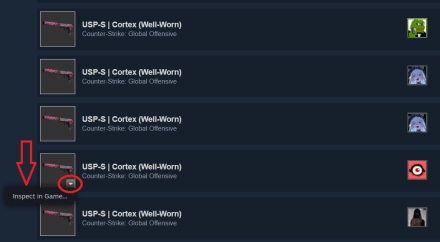
The float is not shown as a front-and-center stat in CS2 by default, but can be viewed by inspecting the item in your inventory, where it appears as a decimal below the wear condition label. Two Factory New skins from the same weapon and finish can look noticeably different from each other because one sits at 0.01 and the other at 0.06, which is why the exact float matters for value-informed purchases, not just the condition label sitting above it.
The Five Wear Conditions
These are the current CS2 wear-tier ranges, and they have remained consistent in practice.
A 0.01 float FN skin looks significantly better than a 0.069 float FN skin, even though both are labeled Factory New. This within-condition variation is why the exact float matters, not just the condition label. A 0.069 FN and a 0.071 MW can look almost identical in-game while carrying a meaningful price gap because one carries the FN label, which means you are sometimes paying for a classification rather than a visual difference.
Float Caps: Why Some Skins Cannot Exist in Every Condition
Some skins have capped float ranges, which means certain wear tiers cannot exist for them because Valve sets the minimum and maximum float at design time for each skin individually.
The Desert Eagle Blaze has a float range of 0.00-0.08, so it only exists in Factory New and Minimal Wear. The AWP Asiimov has a float range of 0.18-1.00, meaning no Factory New or Minimal Wear versions exist and Field-Tested is as clean as it gets. These caps are set deliberately and directly affect the output of trade-up contracts.
Float caps have a practical consequence that most players discover too late: if your target skin has a minimum float of 0.18, the trade-up output can never be Factory New regardless of how low your input floats are, because the formula is bounded by that minimum. Checking the float range of your target skin before building a trade-up strategy takes thirty seconds and prevents a lot of frustrating results.
How Finish Type Determines Whether Float Is Worth Paying For
Float sensitivity varies by finish type and individual skin, so the premium worth paying depends on both the specific skin's appearance and how the market prices it. The general framework, which applies to most skins but has exceptions:
Finish Types That Tend to Show Obvious Float-Driven Wear
Hydrographic finishes wear by scratching, where the underlying surface shows through where the pattern chips away. The AK-47 Vulcan and AK-47 Redline are both Hydrographic, and the difference between a 0.01 and 0.06 FN on either is visible at a glance on the weapon's flat panels and corners. The market consistently prices this difference, and float premiums on well-regarded Hydrographic skins are generally recoverable on resale.
Spray-Paint finishes degrade similarly. The M4A4 Asiimov shows visible paint deterioration at higher floats, with the surface peeling and the underlying material becoming more prominent. Spray-Paint and Hydrographic are the two finish categories where the "always check float" advice most consistently applies.
Many Custom Paint Job finishes behave similarly to Hydrographic in terms of scratch visibility, though the specific wear pattern varies enough per skin that checking the individual item is more reliable than treating the entire finish category as uniform.
Finish Types Where Float Matters Less, With Exceptions
Patina finishes (AWP Medusa, AK-47 Case Hardened) wear by darkening and shifting in tone rather than by scratching. The visual difference between 0.05 and 0.30 on a Patina skin is much subtler than on a Hydrographic skin at the same floats, which makes float premiums on Patina harder to recover unless you are targeting a very specific tonal range that the market actively rewards. The exception: some collectors specifically seek higher-float Patina skins where the darker tones create a preferred aesthetic, and the market does reflect that on certain items.
Gunsmith finishes behave similarly, shifting tone and depth without producing heavy scratches. For most buyers, the float premium on a Gunsmith skin is smaller than the price difference suggests.
Anodized finishes and pattern-index-driven skins (Marble Fade and similar) carry an important nuance. Pattern index is the primary value driver on pattern-dependent skins, with float playing a secondary role, but float still affects wear expression on some Anodized skins and should not be ignored entirely. The safest approach is to inspect both pattern and float on anything in this category before committing.
The rule that applies across all categories: pay for float when the visual advantage is obvious on that specific skin and the market actively rewards it. When either of those conditions is absent, float premium is largely cosmetic in the accounting sense, which is to say it costs money without adding recoverable value.
Edge-of-Tier Floats: The FN-Look MW Play
A 0.0699 MW that looks indistinguishable from Factory New sells for more than a standard MW. You get the visual quality of Factory New without paying Factory New prices. The mechanism is simple: the condition boundary sits at exactly 0.07, so a skin at 0.0699 carries the MW label but has almost the same wear amount as a 0.06 FN.
The price gap between FN and MW on popular skins often far exceeds the visual gap at the tier boundary, particularly on expensive items where the FN label itself carries collector significance. A 0.068-0.069 MW on a skin you want gives you near-FN appearance at MW cost, and that difference is one of the more consistent value opportunities in the float market for players who want a clean loadout without paying for the label. The same logic applies at every tier edge: a 0.151 FT sits at the cleanest possible Field-Tested and often looks comparable to a mid-range MW of the same skin, while costing considerably less.
Extreme Floats: Sub-0.01 FN and the High-Float Collector Market
Sub-0.01 Factory New copies of expensive skins command premiums that scale with both the skin's rarity and its finish type. The visual difference between 0.001 and 0.05 is genuine and immediately visible on float-sensitive finishes, and record-holding floats carry additional prestige beyond that.
As a market snapshot from SkinInspector (April 2026): an AK-47 Redline FN at 0.01 was listed at roughly $80, compared to roughly $32 for a standard FT at 0.25, approximately 2.5x more. An AWP Dragon Lore FN at 0.001 was listed above $5,000, while FT copies at 0.30 were available around $800, a difference of over six times. These figures reflect a specific point in time and will not be stable, but they illustrate the scale at which float affects pricing on valuable skins compared to more common ones.
At the high-float end of the spectrum, Blackiimov is a community term for unusually high-float AWP Asiimovs, often discussed in the community around the very high 0.9x range, where the finish darkens significantly enough to create a visually distinct look that some collectors prefer. The exact cutoff is not standardized, and the terminology is informal rather than any official CS2 category, but the collector interest is genuine and reflected in market premiums for qualifying items.
Max-float Battle-Scarred items at 0.999+ also attract collector premiums purely for their statistical rarity, regardless of visual appeal.
The Trade-Up Formula: Targeting a Specific Float Output
When you perform a trade-up contract with 10 input skins, the resulting skin's float is calculated as: Output Float = (Average Input Float) × (Max Float − Min Float) + Min Float, where Min Float and Max Float refer to the output skin's float range.
The following is an illustrative calculation to show how the formula works in practice, not a guaranteed trading strategy. Suppose you are targeting an AWP Asiimov (float range 0.18-1.00) and want the output to land near the cleanest possible FT, around 0.18-0.20. Working backwards: for a target output of 0.19, the formula becomes 0.19 = Average Input Float × (1.00 - 0.18) + 0.18. Solving gives an average input float of approximately 0.012, which means your 10 input skins need to average a float of 0.012. That requires very low-float FN inputs, which cost more upfront, but the output lands at the cleanest attainable FT for that skin rather than somewhere mid-range.
The formula also shows why targeting a specific output on a skin with a narrow float range is more predictable. A narrow range compresses variance, so each change in input average has a smaller effect on the output. Wide ranges like the Asiimov's 0.82-wide span amplify every shift in input float, making precise targeting harder and the results more spread.
How to Check Float in CS2
Four methods in order of practical usefulness:
- In-game inspect: The float number appears below the condition label when you inspect any skin in your inventory.
- CSFloat.com: The community's most widely used float inspection tool. The browser extension adds float values to Steam Community Market listings directly, which is the most efficient method for comparing floats across multiple listings before buying.
- SteamAnalyst: Shows float alongside historical price context for any item, useful for understanding the float-to-price relationship on specific skins.
- Skinport and other third-party platforms: Display float on listing pages directly, making float-based comparison part of the normal browsing experience.
The Steam Community Market does not display float values on listings by default, which is why third-party tools have become standard practice for anyone making float-informed purchases.
FAQ
What is float value in CS2?
Float value is a permanent number between 0.00 and 1.00 assigned to every CS2 skin when it is created. It determines the skin's wear condition (Factory New through Battle-Scarred) and how visually worn it appears. Float is permanently assigned at creation and cannot be changed afterward.
What are the current CS2 float ranges for each wear condition?
Factory New is 0.00-0.07, Minimal Wear is 0.07-0.15, Field-Tested is 0.15-0.38, Well-Worn is 0.38-0.45, and Battle-Scarred is 0.45-1.00. These are the current wear-tier ranges and have remained consistent in practice.
Why can some CS2 skins not exist in every wear condition?
Each skin has a minimum and maximum float range set by Valve at design time. If the float range does not include values below 0.07, no Factory New version of that skin can exist. The AWP Asiimov (0.18-1.00 range, no FN or MW possible) and Desert Eagle Blaze (0.00-0.08 range, FN and MW only) are confirmed examples.
Is it always worth paying more for a lower float?
No. Float sensitivity varies by finish type and specific skin. On finish types where wear appears as visible scratching and paint damage, lower float produces a clearly better result and the market prices that consistently. On finishes where wear shifts tone or darkens the surface without producing heavy scratches, the visual return on a float premium is often smaller than the price difference suggests.
What is the Blackiimov?
Blackiimov is an informal community term for unusually high-float AWP Asiimov skins, most commonly discussed around the very high 0.9x float range, where the finish darkens significantly enough to create a visually distinct look with established collector interest. The exact cutoff is not standardized.
How does float affect trade-up contracts?
The output float is calculated as: Output Float = (Average Input Float) × (Max Float − Min Float) + Min Float, where Min Float and Max Float refer to the output skin's float range. To target a specific output float range, you work backwards through the formula to find the required average input float, then source your 10 input skins to hit that average.

发布于 在 CS2