Is CS2 CPU or GPU-intensive? What Hardware Actually Matters

Geplaatst op in CS2
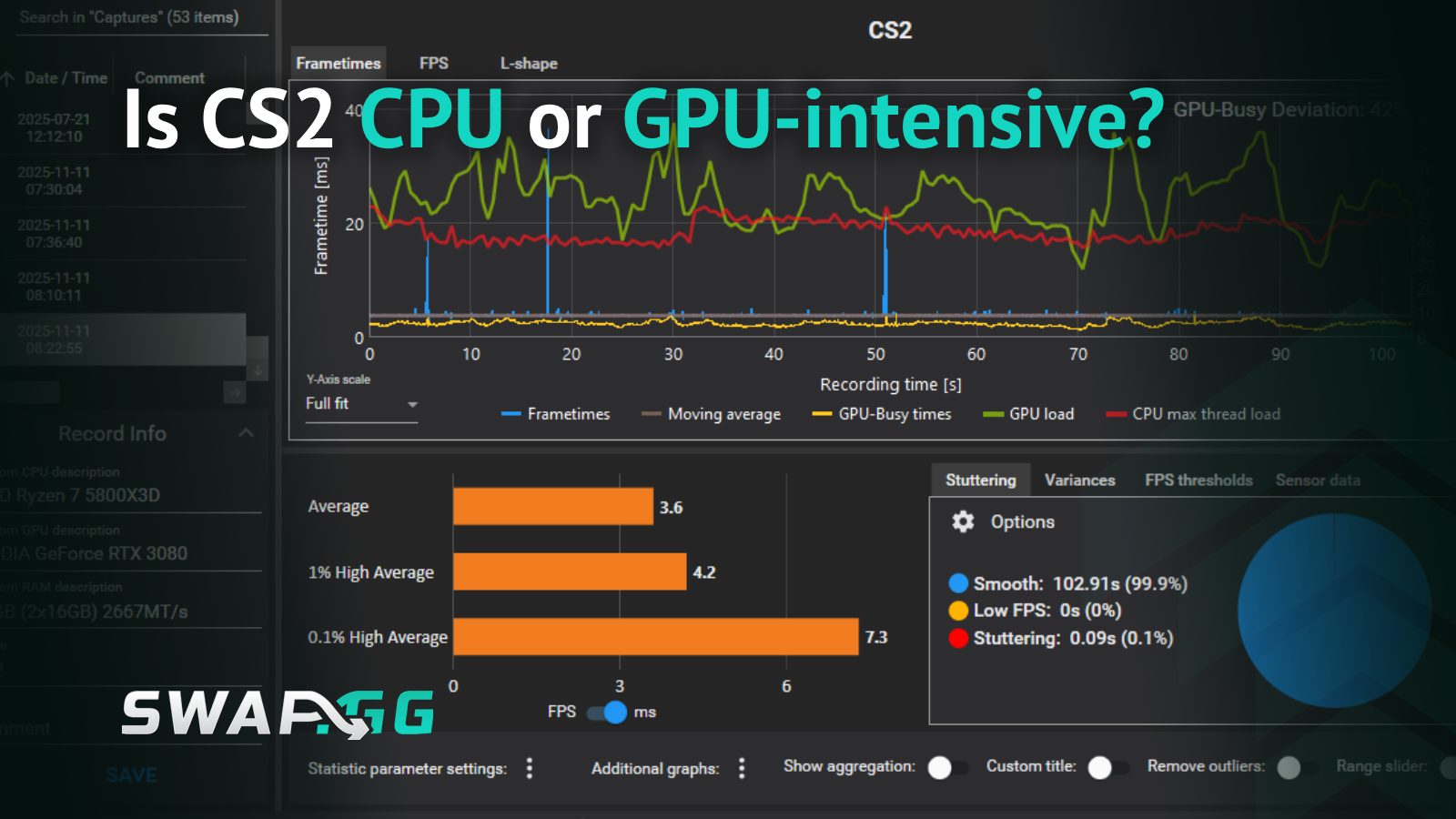
Performance testing reveals something unexpected about where Counter-Strike 2 actually pushes your hardware. While Source 2's upgraded smoke effects and lighting suggest graphics card demands, the reality of what limits your framerate tells a different story. Understanding which component handles the heavy lifting determines whether your next upgrade gets you from 144 FPS to 240 FPS or leaves you disappointed with minimal gains.
This guide breaks down which hardware bottlenecks your performance, what specs you need for different refresh rates, and where to spend your upgrade budget for maximum FPS gains.
Why Your CPU Gets Hammered
Your processor calculates bullet trajectories, determines hit registration, and manages map interactions every time you shoot. This happens constantly throughout every round, creating sustained CPU demand rather than occasional spikes.
The subtick system processes player actions between traditional tick intervals, increasing computational load significantly compared to CS:GO. Your CPU now captures movements, shots, and utility throws more frequently to reduce input lag. When ten players are fighting on site, your processor coordinates all their positions, actions, and synchronization in real-time.
Single-core performance matters more than core count. A six-core processor with high clock speeds will outperform an eight-core chip with lower frequencies. CS2 shows GPU-Busy deviation of 49% at 1080p Very High settings, meaning your graphics card waits for the CPU to prepare frame data half the time.
Processors with larger L3 cache like AMD's 3D V-Cache technology reduce latency between the CPU and game data. This creates more stable frametimes and fewer stutters during clutch moments. The extra cache means your processor spends less time fetching information from RAM.
GPU Demands in Source 2
Source 2 brings volumetric smoke that renders as three-dimensional particles interacting with light sources. When smoke fills Mirage palace or Inferno banana, your graphics card renders these dynamic particles while calculating lighting changes. This system demands more VRAM and processing power than CS:GO's simple 2D smoke sprites.
At 4K using Very High settings, CS2 consumes up to 10GB of VRAM. This drops to 6GB at 1080p on the same preset. Texture quality, shadow detail, and particle density drive this memory usage, explaining why 4K players need cards with adequate VRAM buffers.
Testing shows 252 FPS at 1080p, 238 FPS at 1440p, and 180 FPS at 4K using maximum settings. The small gap between 1080p and 1440p compared to the 4K drop reveals that resolution scaling hits GPU performance harder than quality presets at lower resolutions.
Anti-aliasing tanks performance. MSAA drops framerate by 10% from 2x to 4x settings, with roughly 20% reduction compared to disabled AA. Most competitive players skip these GPU-heavy settings entirely, prioritizing framerate over visual clarity.
Hardware for Different Refresh Rates
For 144Hz at 1080p, pair a modern six-core processor with a GTX 1660 or better. The CPU determines your minimum framerate during intense rounds, while the GPU handles visual quality. Upgrading from a Ryzen 5 3600 to a Ryzen 7 7800X3D typically gains 80-100 FPS, while jumping from a GTX 1660 to an RTX 4060 adds only 20-30 frames at medium settings.
Hitting 240Hz consistently requires at least an Intel i5 or Ryzen 5 CPU with strong single-thread performance, paired with a GTX 1080 or superior GPU. Your processor needs to prepare 240 frames per second before your graphics card can render them. If your CPU caps at 200 FPS, your RTX 4070 sitting at 40% usage doesn't matter.
For 360Hz monitors, you need top-tier hardware. Most CS2 pros run AMD Ryzen 7 or 9 processors with RTX 3080 or better GPUs. They also use fast RAM configurations like DDR4-3600 or DDR5-6000 with tight timings to reduce latency between the processor and system memory.
Players running 1440p or 4K with high graphics presets shift the balance toward GPU intensity. At these resolutions, your graphics card becomes the bottleneck while CPU demands stay relatively constant. A $300 graphics upgrade provides better returns than a processor upgrade when playing at 1440p High settings.
Optimizations That Actually Work
Check your usage percentages during matches using MSI Afterburner or similar monitoring tools. If you see 95% CPU usage with 40% GPU usage, your processor is the bottleneck. High GPU usage with moderate CPU usage means your graphics card limits performance.
Raising graphics settings from Low to High balances system load when your CPU maxes out but your GPU sits at 45% usage. This might drop you from 300 FPS to 250 FPS while increasing GPU utilization to 75%, creating a more efficient hardware setup.
Set Windows to High Performance mode and disable GPU power management. These settings prevent your components from downclocking during gameplay to save power. Your hardware maintains maximum clock speeds instead of throttling during crucial rounds.
RAM speed affects CPU performance indirectly. DDR4-3600 or DDR5-6000 memory reduces latency when your processor handles thousands of calculations per second. Fast RAM with tight timings matters more in CPU-bound scenarios than GPU-limited situations.
Close background applications before launching CS2. Discord, browser tabs, and streaming software compete for CPU resources. A game using 65% CPU under ideal conditions can spike to 95% when other programs run simultaneously, causing stutters during firefights.
Spending Your Upgrade Budget
If you're upgrading a single component, focus on the most powerful CPU within budget for 1080p competitive play. A $300 processor upgrade typically improves CS2 performance more than a $300 graphics card upgrade when running medium settings at 1080p.
Modern mid-range GPUs like the RTX 3060 or RX 6700 XT handle 1440p at high settings above 144 FPS. For 1080p competitive players, even an RTX 3050 or RX 6600 suffices because the CPU handles most performance-limiting work.
Balanced systems perform better than lopsided configurations. Pairing an RTX 4070 with a budget quad-core processor creates an imbalanced setup where the graphics card sits underutilized. Match a modern six to eight-core CPU with a GPU that fits your resolution and graphics quality targets.
Storage needs at least 100GB free space for the game and workshop content. An SSD improves loading times between matches but doesn't affect in-game FPS once maps load. Spend your budget on CPU and GPU performance rather than premium storage unless you're sitting through 30-second load screens.
The game runs on minimum specs of 4 hardware CPU threads, 8GB RAM, and 1GB VRAM with DirectX 11 support. These specs allow the game to launch, but expect 60 FPS on low settings with stuttering during action. Competitive play requires substantially better hardware to maintain stable framerates when utility floods the screen and multiple players peek simultaneously.

Geplaatst op in CS2