How to Use the CS2 Grenade Crosshair for Insta-Smokes

にCS2で投稿
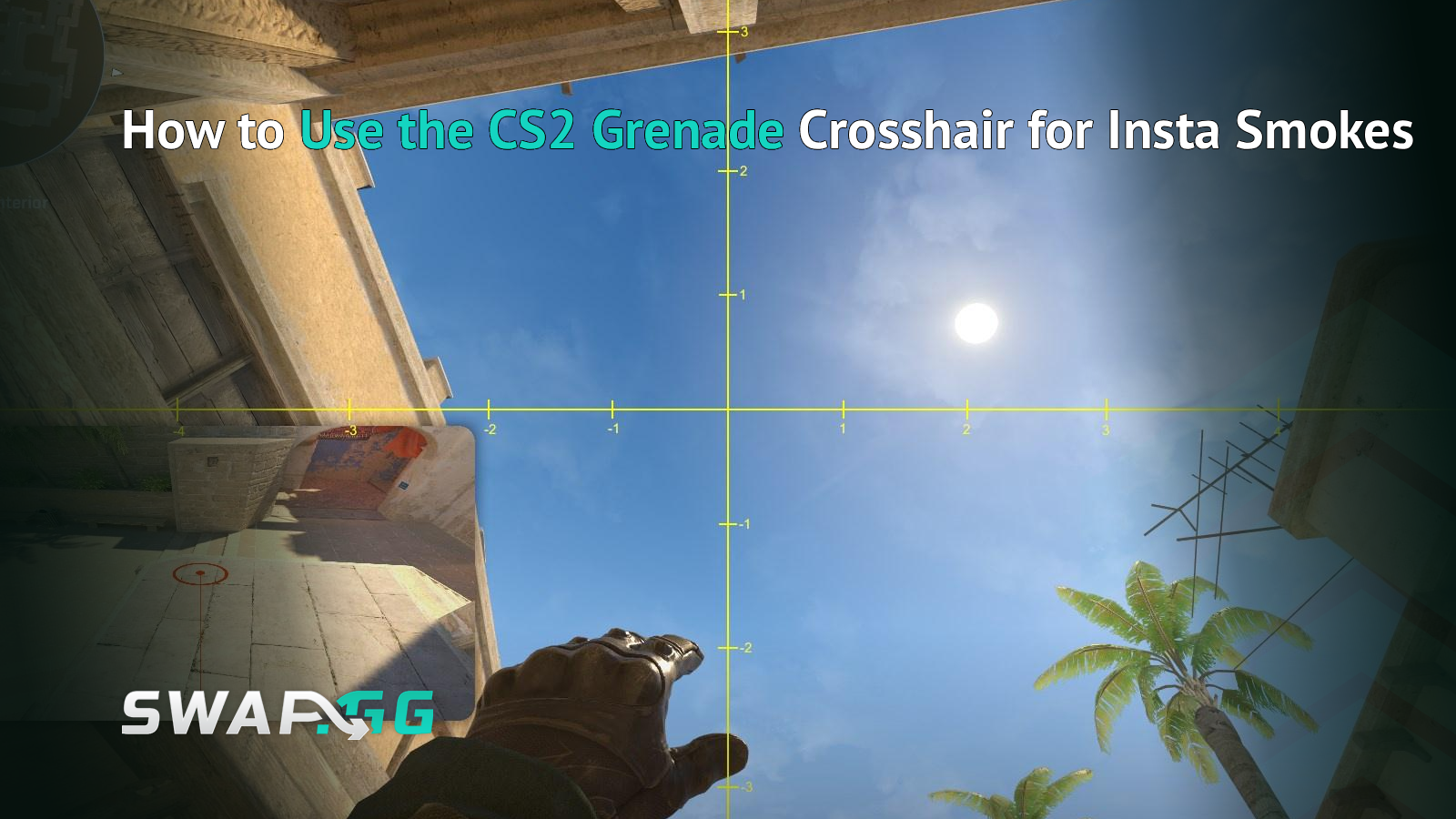
After Valve's September 30, 2026 update, you can set up CS2 insta-smokes during freeze time with the built-in grenade crosshair. Just equip a smoke and hold the grenade attack button before the round begins. When the crosshair shows up, use its lines to aim at a known spot on the map, so you don't have to wait for the barrier to drop. This update makes spawn-based smokes easier, but you still need to know the lineup and throw it right. You can also make the crosshair appear faster if you want.
What Changed for Insta-Smokes in CS2?
Valve's September 30 update lets you use the grenade lineup crosshair during freeze time. Before, the reticle only showed up after you held the throw button during live play, so you couldn't use it while waiting at spawn. Now, you can get your aim ready before the round starts, as long as you have the grenade equipped and hold an attack button.
Definition: An insta-smoke is a smoke thrown immediately at the start of a round, commonly from a specific spawn position. Players use it to block an early sightline or contest a route without spending the first few seconds finding an aim point.
A common example is the Mirage T-spawn Window smoke, which many players set up this way. The aim point changes depending on your spawn and the lineup, so the new reticle doesn't give everyone the same throw. You still need to follow the instructions for the smoke you want to use.
The grenade crosshair has been around since before this update. Valve only changed when it appears, not how smoke grenades work. On October 2, they also fixed a bug with how the crosshair looked when set to 3 pixels thick.
How Do You Use the Grenade Crosshair During Freeze Time?
To set up a smoke during freeze time, get your grenade ready before the round begins and use the bigger reticle to line up with a spot on the map. This is easiest while everyone is still at spawn, so you have time to aim without slowing down your start.
- Buy a smoke and equip it during freeze time.
- Hold either grenade attack input, typically the left or right mouse button, depending on the lineup. Either input can bring up the grenade crosshair.
- Wait for the grenade lineup crosshair to appear. The default smoke delay is 2 seconds, unless you have changed it.
- Match its lines or ticks to the map landmarks used by your specific smoke lineup.
- At round start, perform the throw required by that lineup, including any movement or jump timing it calls for.
An insta-smoke might need a standing throw, a jump throw, or a throw with movement. Seeing the crosshair early helps you aim, but you still need to use the right technique. Left and right click give different throw strengths, so use the one your lineup needs. When freeze time ends, let go of the attack button to throw. Make sure to follow the exact input and timing for your lineup.
To practice consistently, always use the same spawn spot, reference points, and throw method. If you learn a lineup from one T-spawn, it might not work from another. The crosshair helps you aim from the right spot, but it can't fix starting from the wrong place.
Which CS2 Grenade Crosshair Settings Are Worth Changing?
The smoke crosshair delay sets how long you need to hold the throw button before the lineup reticle shows up. By default, it's 2 seconds in CS2. If you want the reticle to appear faster during freeze time, you can lower this value. It won't change how long the smoke takes to travel.
Smoke Crosshair and Delay
These client-side console commands control the smoke reticle:
cl_grenadecrosshair_smoke 1
cl_grenadecrosshairdelay_smoke 0.5
The first command turns on the smoke grenade crosshair. The second sets the delay to half a second, which is just a suggestion, not the standard for competitive play. If you like the default, use cl_grenadecrosshairdelay_smoke 2. A shorter delay is helpful if you want the crosshair to show up right away, but it might also appear during regular mid-round grenade throws when you don't need it.
If your console is off, turn on Enable Developer Console in CS2's settings before you enter any commands. Valve's September update also added a Crosshair/Scopes tab in the settings. You can find grenade lineup options there instead of using an old screenshot of the settings menu.
Other Grenades and Crosshair Display
The same feature exists for other grenade types, with separate switches and delays:
Each grenade type has a default delay of 2 seconds. If you only care about spawn smokes, you don't need to change the other grenade settings. The command cl_grenadecrosshair_keepusercrosshair 1 keeps your normal crosshair visible with the grenade reticle. If you set it to 0, your regular crosshair will be hidden when the grenade reticle shows up.
Does the New Grenade Crosshair Replace Smoke Lineups and Binds?
The built-in grenade crosshair is just a tool to help you aim. You still need to know where to stand, what to aim at, and how to throw for each lineup. It doesn't show where the grenade will land, adjust for different spawns, or turn a standing throw into a jump throw. For insta-smokes, you still have to time your throw at the start of the round.
If your lineup uses clear map reference points, the reticle means you don't have to switch to a big temporary crosshair before every round.
Some players still like using custom binds. In a September 24 r/GlobalOffensive thread, one player said they use a very long crosshair to line up with landmarks at the edge of the screen, but the September update made it shorter. The built-in grenade reticle might not work for every setup like this. For those lineups, it might be better to adjust your reference points or keep your custom settings instead of trying to use the default reticle.
You don't have to keep a short smoke delay for the whole match. If the reticle is distracting when you throw a quick reaction smoke, just increase the delay or go back to the 2-second default. Using freeze-time alignment should help with your opening throw without making it harder to use other grenades later.
Why Isn't My Grenade Crosshair Showing in Freeze Time?
If you hold the smoke grenade's attack button and don't see the lineup reticle, first check the smoke-specific setting and delay. The September 30 update turned on this feature during freeze time, but if the grenade crosshair is off or you haven't waited long enough, it might seem like nothing has changed.
- Smoke reticle disabled: Enter cl_grenadecrosshair_smoke 1 to enable it.
- Delay too long: Check cl_grenadecrosshairdelay_smoke. With the default value of 2, you must hold the button long enough for the reticle to appear.
- Wrong grenade equipped: The crosshair has separate settings for smoke, flash, HE, fire and decoy grenades. Changing the flash delay won't change the smoke delay.
- Unexpected display: Verify your settings in the current Crosshair/Scopes tab. Valve fixed a grenade-crosshair rendering issue affecting 3-pixel crosshair thickness in its October 2 update.
To test this without using up a live round, start a private practice match or use a grenade-practice map. Make sure the reticle shows up before the round begins, then throw a smoke you know and see where it lands.
FAQ
Can You See the CS2 Grenade Crosshair During Freeze Time?
Yes. Valve made grenade lineup crosshairs available during freeze time on September 30, 2026. Just equip a grenade, hold an attack button, and wait for the reticle to appear. For smoke grenades, the delay is set by cl_grenadecrosshairdelay_smoke and is 2 seconds by default. You can get your aim ready before the round starts, but you still need to throw it the right way.
How Do You Make the Smoke Crosshair Appear Faster?
Lower cl_grenadecrosshairdelay_smoke in the developer console. For instance, cl_grenadecrosshairdelay_smoke 0.5 sets a half-second delay, while 2 restores the documented default. The setting only affects when the reticle appears. Smoke flight speed and landing position do not change.
Does the Grenade Crosshair Show Where Your Smoke Will Land?
No. Its lines and ticks help you align with landmarks on the map, but the reticle does not predict the landing position. The result still depends on your spawn, aim and throw method. Check the landing spot with practice-mode grenade tools before relying on the lineup in Premier.
Do You Need a Jump-Throw Bind for Freeze-Time Insta-Smokes?
Not for every insta-smoke. The required throw depends on the particular lineup, and some work with a standing release while others require a jump or movement input. The September 30 change lets you line up the aim during freeze time. It does not handle jump timing for you.

にCS2で投稿