How to Enable Grenade Trajectories in CS2 (Console Commands + Setup)

发布于 在 CS2
You're in practice mode trying to learn that Mirage window smoke everyone uses, and after 20 attempts you still can't figure out why it keeps landing short. CS2 has a built-in feature that shows you exactly where your grenades will go before you throw them, but it's hidden behind console commands that most players never bother looking up.
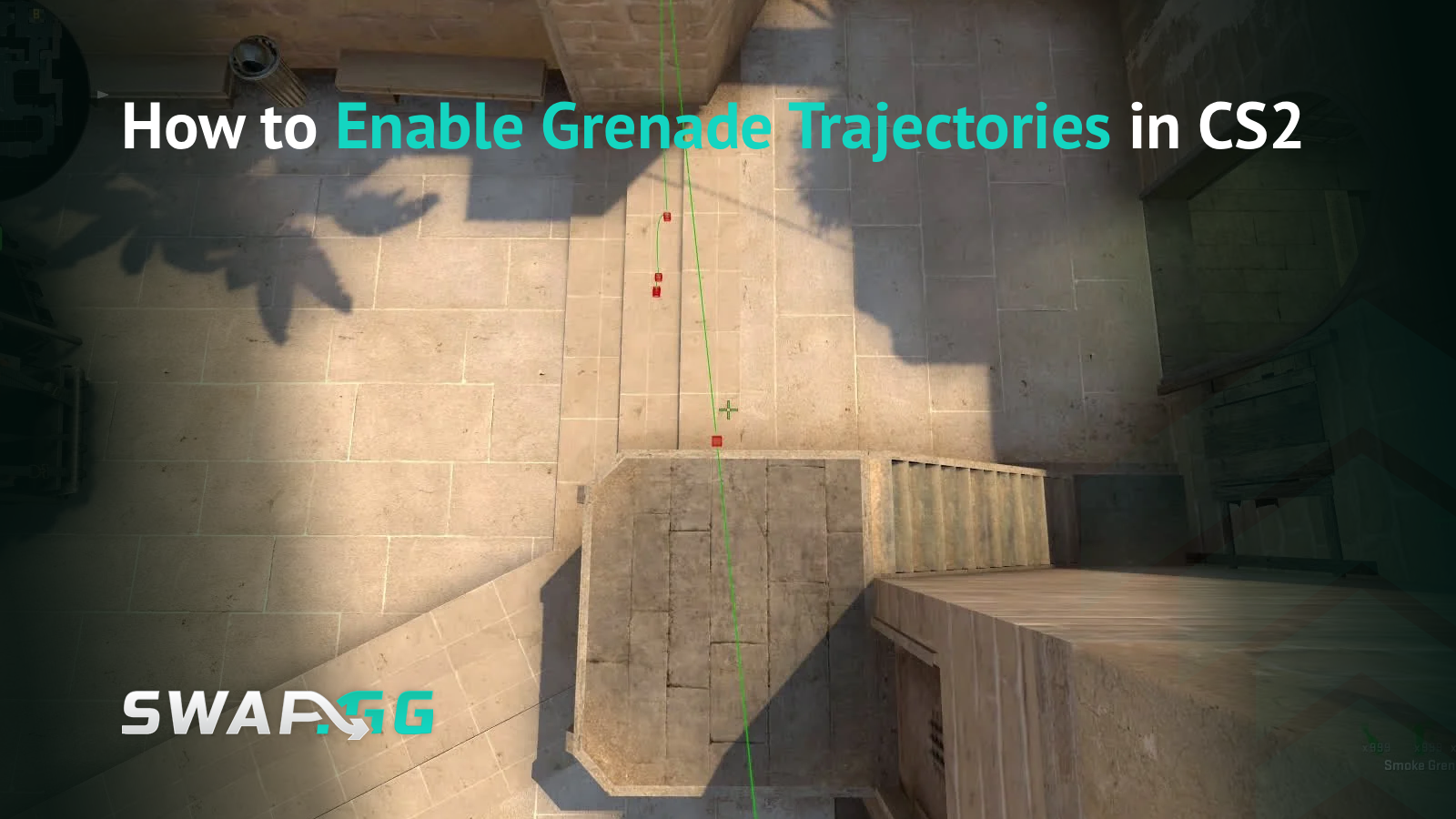
Grenade trajectories display the full flight path of your utility, including bounce points and landing positions. Once you enable them, learning lineups goes from hours of guesswork to actually understanding what you're doing wrong. Here's how to set it up and use it to build muscle memory that works in real matches.
What Grenade Trajectories Actually Show You
When you enable trajectories and pull out a grenade, you'll see a colored line tracking its flight path through the air, markers where it bounces off surfaces, and a final indicator showing where it lands or detonates. Different grenades show different information because they behave differently. Smokes display where the bloom happens, flashes show the pop location, and HE grenades mark the explosion center.

Each grenade type uses its own color, which helps when you're practicing site executes with multiple utilities. Smokes are green, flashes are blue, HE grenades are red, molotovs are orange, and decoys are yellow. This means you can throw five grenades in sequence and still track which trajectory belongs to which utility.
Why You Can't Use This in Matchmaking
Trajectories only work in practice mode or on servers where you have admin permissions, which means you need your own local server. You can't enable this in matchmaking or on most community servers, and that's intentional. Seeing trajectories in competitive matches would remove the skill requirement entirely, turning lineups into point-and-click instead of practiced mechanics.
Console Commands You Need
First, enable the developer console if you haven't already. Go to Settings, then Game Settings, and turn on "Developer Console." Set your console key (default is tilde: ~), then press it to open the console.
Enter these commands in this exact order:
sv_cheats 1
sv_grenade_trajectory 1
sv_grenade_trajectory_time 10
sv_grenade_trajectory_thickness 0.5
The first command enables cheat commands, which you need for trajectories to work. The second turns on the actual trajectory visualization. The third controls how long the lines stay visible after throwing (10 seconds works well for most practice). The fourth adjusts line thickness so you can see it clearly without it being obnoxious.
Throw any grenade after entering these, and you'll see its complete path visualized.
Other Useful Practice Commands
While you're in console anyway, add these to make your practice sessions way more efficient:
mp_roundtime_defuse 60
mp_freezetime 0
mp_buytime 60000
mp_buy_anywhere 1
sv_infinite_ammo 1
bot_kick
mp_restartgame 1
These extend round time to 60 minutes so you're not constantly restarting, remove freeze time, let you buy from anywhere with unlimited buy time, give you infinite grenades, kick bots, and let you restart rounds instantly. Just copy the whole block into console and you're good.
Setting Up Your Practice Server
Creating a local server takes like 30 seconds. Open CS2, click "Play," select "Practice," choose your map, and hit "Go." You now have a private server with full admin permissions where all these commands will work.
Making a Practice Config File (So You Don't Retype This Every Time)
Typing 10+ commands every time you want to practice gets old fast. Make a config file that loads everything automatically instead.
Go to Steam/steamapps/common/Counter-Strike Global Offensive/game/csgo/cfg/ and create a new text file called practice.cfg. Add these commands:
sv_cheats 1
sv_grenade_trajectory 1
sv_grenade_trajectory_time 10
sv_grenade_trajectory_thickness 0.5
mp_roundtime_defuse 60
mp_freezetime 0
mp_buytime 60000
mp_buy_anywhere 1
sv_infinite_ammo 1
bot_kick
Save it, and now you just type exec practice in console to load everything. Way better than manually entering commands every session.

How to Actually Learn Lineups (Not Just Watch Pretty Lines)
Seeing where your grenades go is cool, but it doesn't automatically make you better. You need a process that turns visual feedback into muscle memory.
Phase 1: Figure Out the Throw
Find your lineup position using map geometry or obvious references like corners, windows, or specific textures. Throw the grenade a bunch of times while watching the trajectory closely. Pay attention to where you're aiming, whether you're moving or standing still, and which mouse button you're using (left-click for full throw, right-click for short toss, both for medium).
Note anything the grenade bounces off because those surfaces are crucial for replicating the lineup. Sometimes a smoke that looks simple is actually banking off two walls before landing.
Phase 2: Get It Consistent
Practice the same lineup 10 to 15 times in a row until you nail it every time. Focus on your exact positioning, crosshair placement, and timing. Look for visual cues that help you line it up without needing pixel-perfect positioning, like lining up your crosshair with a specific corner or standing where two textures meet.
Phase 3: Try It Blind
Turn off trajectories with sv_grenade_trajectory 0 and throw from memory. Turn them back on after to check if you got it right. Keep doing this until you can hit the lineup at least 8 out of 10 times without any visual help. Anything less than that isn't reliable enough for actual matches where you're under pressure.
Jump Throw Binds (You Need This)
Jump throws require perfect timing between jumping and releasing the grenade, which is basically impossible to do manually with any consistency. You need a bind for this.
Add this to your autoexec.cfg or just type it in console:
alias "+jumpthrow" "+jump;-attack;-attack2"
alias "-jumpthrow" "-jump"
bind "x" "+jumpthrow"
Change "x" to whatever key you want. This bind is completely legal in CS2 matchmaking and makes jump throw lineups actually usable because the timing is perfect every time.
Mistakes Everyone Makes When Learning Lineups
Relying on trajectories for too long is the biggest one. If you never turn them off during practice, you won't build the muscle memory you need for real matches. Not practicing the actual movement to your lineup position is another common mistake because being able to throw the smoke means nothing if you can't safely get to the spot when enemies are pushing.
Learning only one smoke per site limits your options. What happens when a teammate takes your position or enemies rush early? You need backup options. Also, practicing lineups without understanding when to use them means you'll throw perfect smokes at terrible times, like smoking off a site when your team isn't even close to being ready.
Adjusting Trajectory Settings for Different Practice
The sv_grenade_trajectory_time command changes how long the lines stay visible. Use 5 seconds when you're grinding one lineup repeatedly so old trajectories don't clutter your screen. Keep it at 10 for regular practice sessions. Bump it to 20 when practicing full site executes so you can see how multiple grenades interact. Set it to 60 if you're mapping out a complete execute with your full utility set.
For thickness, sv_grenade_trajectory_thickness 0.5 is standard, but you can go up to 1.0 for thicker lines that are easier to see from far away, or down to 0.25 if you want less visual clutter. Just experiment and see what feels right.
Practicing Full Site Executes
Learning individual lineups is one thing, but matches require throwing multiple grenades in the right order. When you're practicing site takes, set trajectory time to 20 with sv_grenade_trajectory_time 20, then throw your complete utility set the way you'd use it during an actual execute.
Watch how everything interacts and where each grenade lands compared to the others. You'll start noticing why certain smokes need to land before others, why specific flashes work better at certain moments in the execute, and where defenders can potentially push through gaps in your utility. Understanding this matters way more than just memorizing throws because it helps you adapt when things go wrong.
You can practice team executes solo by learning multiple lineup positions and moving between them quickly. Time your throws like you have teammates with you, use mp_restartgame 1 to reset and repeat, and turn trajectories off sometimes to test if you can do it all from memory.
Defensive Utility Matters Too
Don't just practice attack utility. Defenders need lineups for molotovs that deny plants or post-plant positions, smokes that stall pushes or buy time for rotations, flashes for retakes, and HE grenades that damage grouped enemies.
Practice defensive lineups the same way, but focus on speed over pixel-perfect accuracy. Defenders usually have way less time to set up utility compared to attackers, so being able to throw fast matters more than being millimeter-perfect.
Making the Jump to Real Matches
The whole point of this is building muscle memory that works without visual help. Start with trajectories on and unlimited time to learn the basic mechanics. Then add a 10-second timer to practice finding positions and throwing quickly. After that, turn trajectories off completely and test your memory. Finally, add pressure by practicing with movement from spawn, pretending you're being shot at, or working with low time.
Before you use any lineup in competitive, make sure you can hit it 9 out of 10 times without trajectories, find the position within 5 seconds of spawning, execute it even when you're slightly off position, and throw it while moving or under pressure. If you can't check all those boxes, it's not match-ready.
Building Your Lineup Collection
Don't try to learn every lineup on every map. That's overwhelming and unnecessary. Start with essential smokes: one-ways that block common angles, standard site execute smokes for maps you actually play, and basic defensive smokes. Then add situational stuff like pop flashes for specific peeks, molotovs for clearing corners, and backup smokes for when plan A doesn't work. Save advanced setups (multi-part executes, weird one-ways, fake utility for lurks) for last.
This keeps you from getting overwhelmed while building a foundation of reliable utility you'll actually use.
Other Ways to Practice
Workshop maps like Yprac and Operative Training have preloaded lineups with visual guides and automated checks to verify you hit them correctly. These often have extra features that vanilla practice doesn't, like saved positions and timing practice.
Watching pro POV demos teaches you not just how to throw utility but when to use it. Download a match from HLTV, watch a player in their POV to see exactly how they throw grenades, note their positioning and timing, then recreate it in practice with trajectories to verify.
Recording your practice with ShadowPlay, ReLive, or OBS helps you spot inconsistencies. Watch your footage to see if your positioning changes between attempts, compare good throws to bad ones, and use slow motion to catch timing issues you wouldn't notice in real-time.
Why This Speeds Up Learning
Before trajectories, learning a lineup could take hours of just throwing grenades and hoping something worked. With trajectories, that same lineup takes maybe 30 minutes because you instantly see what's wrong. You'll also learn how grenade physics actually work (how hard you throw affects distance, how angles change bounces, why some grenades slide while others stop, how height affects landing), which helps you create your own lineups instead of just copying what you see in videos.
When a lineup stops working after a map update, trajectories help you figure out what changed. Did Valve move something? Is your positioning different? Visual feedback makes debugging way faster than guessing.
Sample Practice Session (30 Minutes)
First 5 minutes: Load your practice config, throw some smokes you already know to warm up, and make sure your jump throw bind works.
Next 10 minutes: Pick one new lineup from a guide or pro demo and practice it 15 to 20 times with trajectories on. Focus on getting it consistent before worrying about speed.
Next 10 minutes: Turn trajectories off and run through lineups you already know. Turn them back on briefly after each throw to verify accuracy.
Last 5 minutes: Practice moving from spawn to lineup positions quickly, throw with self-imposed time limits, and add some pressure by pretending enemies are pushing.
Long-Term Practice Plan
Weeks 1-2: Learn basic smokes for one map with trajectories on.
Weeks 3-4: Practice those smokes without trajectories and start adding flashes and molotovs.
Weeks 5-6: Add a second map and practice combining utility in full executes.
Weeks 7-8: Focus on speed and consistency under pressure without visual aids.
Week 9+: Maintain what you know while slowly adding advanced setups.
Load up a practice server, enter sv_cheats 1 and sv_grenade_trajectory 1, and pick one map with three essential smokes to start. Make your practice config so you're not wasting time typing commands, set up your jump throw bind, and remember that seeing trajectories is just the starting point. The actual goal is building muscle memory that works when people are shooting at you.

发布于 在 CS2